Keep the baseline consistent
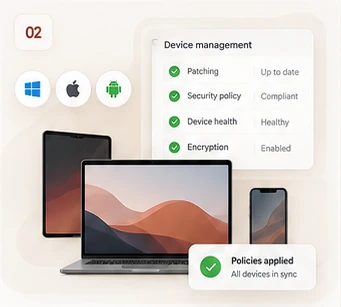
Maintain the agreed configuration for enrolled devices, supported apps and security settings. Record ownership and approved access rather than treating every device as identical.

Computers & mobile devices
Work-ready devices. Less everyday admin.
Keep supported computers and mobile devices organised, configured and maintained.
Monthly fee and coverage agreed after a review. Setup and licences itemised separately.
A good fit for
For teams that need consistent device settings without purchasing a full helpdesk arrangement. Device eligibility, ownership and platform licences are reviewed first.
The ongoing work
Your proposal names the systems, tasks and allowance covered. Here is what the service can include.
Maintain the agreed configuration for enrolled devices, supported apps and security settings. Record ownership and approved access rather than treating every device as identical.
Manage supported patching and app deployment policies, review reported failures and identify devices that need attention. Available controls differ by operating system and management platform.
Keep a record of agreed management actions and report configuration or compliance exceptions. Significant changes and destructive actions require explicit authorisation.
Explore an example
See how an update exception can become a practical next step.
Select a part of the scene to explore.
The management platform reports that an enrolled device is outside its agreed update baseline.
Illustrative example. Reporting depends on enrolment, connectivity and supported platform features. This is a sample situation, not a client result or live data.
A compliant device is not a guarantee against a security incident. Checks depend on device connectivity, enrolment and the platform’s reporting.
Clear from the start
Platform and security licences, device purchases, initial enrolment projects, catch-up remediation and end-user troubleshooting are separately scoped. Remote wipes are never automatic.
Device enrolment & rollout projectsQuestions, answered
We assess supported Windows, macOS, iPhone, iPad and Android devices. Enrolment and available controls depend on the selected platform, licences and device eligibility.
Ownership, privacy and consent are agreed first. Where supported, application-level controls may protect work data without managing the entire personal device.
Not automatically. Device administration is different from troubleshooting individual user problems. Broader remote support is available through a separately agreed managed IT plan.
We review your setup and provide a written proposal covering the monthly fee, service hours, work allowance, response arrangements, onboarding, licences and exclusions. Monitoring does not imply guaranteed 24/7 human response. Existing managed-plan inclusions are checked to avoid duplicate charges.
Start with your existing setup
Tell us what needs attention. We’ll review the fit and explain the proposed work and price before you commit.