Know what ran and what failed
Define the workflows and failure signals to monitor. Where the platform supports it, review execution errors, missing inputs and other agreed exception conditions.

Workflows & integrations
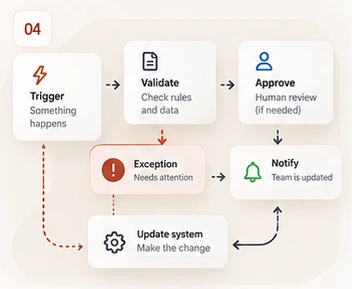
Keep the workflow moving. Catch the exceptions.
Look after existing automations, with failure checks and a clear handover when something changes.
Monthly fee and coverage agreed after a review. Setup and licences itemised separately.
A good fit for
For teams already using Power Automate, n8n or custom workflows that need ongoing oversight. We review each workflow, its dependencies and access before accepting it.
The ongoing work
Your proposal names the systems, tasks and allowance covered. Here is what the service can include.
Define the workflows and failure signals to monitor. Where the platform supports it, review execution errors, missing inputs and other agreed exception conditions.
Investigate failures within the support allowance and identify a safe next action. Retrying a workflow that sends messages, creates records or moves money requires care to avoid duplicate effects.
Record dependencies, ownership and approved changes. Review supplier or integration changes that affect the supported workflow, with larger rework quoted separately.
Explore an example
A stopped workflow needs a safe recovery path.
Select a part of the scene to explore.
An agreed failure check identifies a stopped or rejected workflow run.
Illustrative example. Sensitive actions retain the approval rules agreed for the workflow. This is a sample situation, not a client result or live data.
Monitoring does not make sensitive actions autonomous. Financial, access-control and external messaging actions retain the approval rules agreed for that workflow.
Clear from the start
New workflows, major integration changes, third-party usage fees and custom software projects are separate. Unsupported integrations and incomplete source access may limit coverage.
New business automation projectsQuestions, answered
Potentially. We need sufficient access, documentation and a supported platform to assess them. An initial review or remediation project may be required.
Only where a safe retry policy is explicitly agreed and implemented. A retry must not duplicate payments, messages, account changes or other sensitive actions.
Yes, as separately scoped projects. Automation Care is for maintaining the agreed workflows, not an unlimited development subscription.
We review your setup and provide a written proposal covering the monthly fee, service hours, work allowance, response arrangements, onboarding, licences and exclusions. Monitoring does not imply guaranteed 24/7 human response. Existing managed-plan inclusions are checked to avoid duplicate charges.
Start with your existing setup
Tell us what needs attention. We’ll review the fit and explain the proposed work and price before you commit.